Search This Blog

Wednesday, May 31, 2006

Getting a GUI

After installing Debian, often one is left with just a command line prompt waiting for the user to enter login and password. If you are coming from Microsoft Windows environment, this command line prompt looks similar to the DOS prompt. This article explains how to get a GUI environment after installing basic Debian.

Since I have experience only with KDE, I will try to focus just on installing KDE.

In order to get a working GUI as quickly as possible, run the following two commands as root.

apt-get update
apt-get install xorg kde kdm

This will fetch all the required packages necessary to run KDE.

During the installation of the packages, there will be some questions regarding configuring X environment etc., Once you finish answering all the questions, you will get a working KDE environment.

Last activity: Jan 24, 2007

Friday, May 26, 2006

control kmail sounds

In kmail, the default keyboard shortcut to send messages is ctrl-Enter. When this command is entered, a pop up comes giving the options "Send Now", "Send Later" and "Cancel". However, When this popup comes up, an annoying sound is played. To get rid of this sound use

kcontrol -> Sound & Multimedia -> System Notifications

In the tab on the right hand side, select

"A warning message is being shown"

and remove the sound icon by clicking on corresponding icon. Then click on Apply button on the bottom right hand side and close the kcontrol window.

Tuesday, May 16, 2006

move tabs in konqueror

On the tab that you would like to move, click with the middle mouse button and then drag it to the required place.

This tip has been tested on a Debian Sid machine running

$konqueror --version
Qt: 3.3.6
KDE: 3.5.2
Konqueror: 3.5.2

Sunday, May 07, 2006

How to view changelogs of a Debian package over web

Every installed package on a Debian machine has changelog.gz and/or changelog.Debian.gz depending on whether the package is specific to Debian or not. These files are stored in /usr/share/doc/packagename.

For example, since firefox is not specific to Debian, it has both changelog.gz and changelog.Debian.gz . OTOH, since wajig is specific to Debian, it only has changelog.gz. There is no changelog.Debian.gz for wajig.

changelog.gz refers to changes done by the upstream author where as changelog.Debian.gz refers to changes done by the Debian maintainer.

/usr/share/doc/packagename/changelog.Debian.gz contains the changelog for the installed package. If a new version of package is available in Debian repositories then sometimes it is useful to have a look at just the new changelog without downloading the whole package. In order to see the latest changelog of a package, you can use

http://packages.debian.org/changelog:packagename

So to see changelog of the latest firefox package available in Debian repositories use

http://packages.debian.org/changelog:firefox

As usual, Comments and suggestions can be emailed to kamaraju at gmail dot com.

Sunday, April 30, 2006

subversion migration

On Oct 17, 2005 I posted about gcc being converted from cvs to subversion.

http://malayamaarutham.blogspot.com/2005/10/gcc-cvs-svn.html

In that post, I also stated that I should be migrating to subversion. Well, It finally happened after about 6 months :-) I finally created a subversion repository and migrated couple of my previous projects to subversion. Things look very cool so far!

The documentation for svn is available at http://svnbook.red-bean.com/

In particular, I was impressed with http://svnbook.red-bean.com/nightly/en/svn.intro.quickstart.html which gives an headstart for CVS users.

Go subversion go! You rock!

Thursday, April 20, 2006

bug reports summary

The reports are organized in reverse chronological order so that the latest stay on the top.

Bugs reported and not yet fixed
Bugs reported and fixed (sorted in the order when they are fixed).
This post is last updated on Jan 18, 2007.

Saturday, April 15, 2006

"adsense for search" now included in this blogspot

Of late, I have been posting a lot of stuff on this blog. Now I am at a stage, where, I cannot recall all the articles/issues/musings that have previously been posted. So, I decided to put a google search box in my blog. This search box is a bit different from the default search box provided by blogger.

The default search box that comes with blogger provides two functionalities:
  1. Search this blog
  2. Search all blogs
But it does not allow me to search the web.

The google search box also provides two functionalities:
  1. Search this blog
  2. Search the whole web
As the second option is useful to me, I decided to have google search box in my blog.

Google calls this search box as "adsense for search". Yesterday, I did some css hacking and now my blog is "adsense for search" compliant. The search bar should appear on the right of this blog in the "sidebar".

Any comments regarding this move are most welcome.

On a related note, Sometime ago, I have included "adsense for content" - ie advertisements in this blog. The related post can be found at

http://malayamaarutham.blogspot.com/2005/11/this-blog-is-now-adsense-friendly.html


raju

Monday, April 10, 2006

gmail feature suggestions - 4

Please provide instructions for accessing gmail using kmail as the email client. The relevant instructions can go into http://mail.google.com/support/bin/topic.py?topic=1555

Currently there is only http://mail.google.com/support/bin/answer.py?answer=13287

But this is very unclear. Should one use TLS or SSL when using kmail as their MUA? Also kmail provides 6 different authentication mechanisms such as LOGIN, PLAIN, CRAM-MD5, DIGEST-MD5, NTLM, GSSAPI. It is not clear as to what authentication mechanism one should use with kmail.

raju

Sunday, March 19, 2006

gmail feature suggestions - 3

Today I suggested the following feature to gmail at https://services.google.com/inquiry/gmail_suggest/

Whenever I search for a word or a phrase in my gmail account, only 20 results are displayed per page. This is very inconvenient when there are lots of results. I think it would be cool if there are options to display 20 results per page, 50 results per page, 100 results per page, all the search results in one page.

Saturday, March 18, 2006

reporting emails from petsupermarket as spam to gmail

Whenever I post an email to debian-user@lists.debian.org , I get a spam email from AntiSpam UOL . This email looks something similar to


I cannot just mark this message with "report spam", since that will delete the whole thread. I wanted to save the whole thread for later reference, but at the same time I wanted to report this stupid email as spam. To do this, I discovered a work around which might work, if enough gmail users train their spam filter.

In this antispam UOL email, select the "More options" link (towards your right), then click on "Delete this message". The mail will still be there under the Trash label. Now go to the Trash, select this antispam UOL email, choose "Report as spam" under "More actions" menu. That's it.

Thursday, March 16, 2006

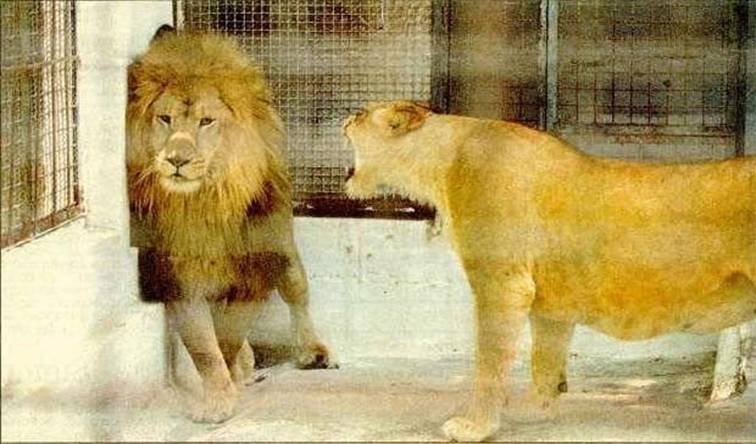
Captions for the photo please!

For convenience, you can refer to the male as M, female as F. Leave your captions in the comments!


1) Even the 'King of the Jungle" has to go through it - every day!

2) A wife is a wife!

Tuesday, March 14, 2006

bugs reported today

I reported the following bug on Texmacs today. I requested to make the pdf version of the user manual available on the texmacs documentation website http://www.texmacs.org/tmweb/help/manual.en.html . Currently only ps version is available there.

More details can be found at https://savannah.gnu.org/bugs/?func=detailitem&item_id=16090

Sunday, March 12, 2006

gmail feature suggestions - 2

Today I suggested the following feature to gmail at https://services.google.com/inquiry/gmail_suggest/

Currently gmail either shows all the labels or does not show any labels. But there is no way to tell gmail to display 'only the labels with unread emails in them'. If there are lot of labels in one's gmail account, it becomes difficult to see where the unread messages are. In such case, I think this feature would be very handy.

Thursday, March 09, 2006

gmail feature suggestions - 1

Today I suggested the following feature to gmail at https://services.google.com/inquiry/gmail_suggest/

Currently it is not possible to search for emails across different labels. This would be a cool feature to have.

Let me explain it more clearly.

Say I have 10 labels in my email account. Let these be named as label1, label2, label3, ... label10. Now I would like to search for emails which are under label4, label7, label9. Currently this is not possible. But IMHO is a very useful feature to have.

Monday, March 06, 2006

How to generate thumbnails

To create thumbnails use the -thumbnail option of the convert command. This option preserves the aspect ratio of the picture. So you need to specify just the width or height of your thumbnail.

Sample commands look like

convert -thumbnail 160 original.jpg thumbnail.jpg
convert -thumbnail x160 original.jpg thumbnail.jpg

The first one creates the thumbnail whose width is 160 pixels. The second one creates a thumbnail whose height is 160 pixels.

Ref :- Linux Multimedia Hacks - Tips & Tools for taming images, audio, and video by Kyle Rankin

On Debian GNU/Linux machines, convert command is part of imagemagick package. You can install the imagemagick package using apt-get

apt-get install imagemagick

Feedback, comments, suggestions are most welcome and can be left in the comments field of this blog.

Followers