Some interesting links which I came across
What's the difference between an embassy and a consulate?
Todo:- Sort these links later.
Sunday, February 25, 2007

Saturday, February 24, 2007
ogg player for Windows
VLC is a nice media player that can play ogg files on Windows. It is a open source software released under GPL.
Why I needed this?
I use wiktionary to search for meanings of the English words. The pronounciation of the words is stored in .ogg format. VLC can successfully play these .ogg files.
Why I needed this?
I use wiktionary to search for meanings of the English words. The pronounciation of the words is stored in .ogg format. VLC can successfully play these .ogg files.
Monday, February 19, 2007
Using vim as a man page reader
vim, gvim can be used to read man pages. To accomplish this add the following lines to ~/.bashrc file.
Advantages of using vim as a man page reader
Sources:
# Use vim as a manpage readerAfter this man pages can be read by using vman or wman. Sample commands look like
function vman {
/usr/bin/man $* | /usr/bin/col -bp | /usr/bin/iconv -c | \
/usr/bin/view -c "set ft=man nomod nolist so=999 ts=8 wrap\
titlestring=man\ $1" -
}
# Use gvim as a manpage reader
function wman {
/usr/bin/man $* | /usr/bin/col -bp | /usr/bin/iconv -c | \
/usr/bin/gview -c "set ft=man nomod nolist so=999 ts=8 wrap\
titlestring=man\ $1" -
}
guest@kusumanchi:~$ vman rsyncTested this on Debian Etch, running vim 7.0.122, gvim 7.0.122, man 2.4.3, iconv 2.3.6.
guest@kusumanchi:~$ wman rsync
Advantages of using vim as a man page reader
- 'marks' can be used to navigate the man pages which can sometimes be quite large. Other pagers such as 'less', 'more' do not have this feature.
- vim's search commands, navigation commands etc., can be used. No need to learn another software or another set of shortcuts.
- ":syn on" gives beautiful colors while reading the man page
- Let's say while reading the man page of ssh, you encounter ssh_config(5). Now to read the man page of ssh_config(5), simply place the cursor on that word and do ctrl-]. This will place you at the man page of ssh_config(5).
Sources:
Sunday, February 18, 2007
parts of a futon frame
The following is a Acme Black Metal Futon Frame containing a full size Futon mattress.

The various parts in this picture are
(A) Left Side Panel
(B) Right Side Panel
(C) Cross Braces (2)
(D) Left Hinge
(E) Right Hinge
(F) Upper Mattress Frame
(G) Lower Mattress Frame
(H) Short Bolts (8)
(I) Long Bolts (8)
(J) Medium Bolts (4)
(K) Protective Pads (4)
(L) Metal Washers (8)
(M1) Lock Washers 1/4'' (8)
(M2) Lock Washers 5/16'' (4)
(N) Large Hex Nuts (4)
(O) End Caps (4)
(P) Small Hex Nuts (8)
(Q) Allen Wrench C-Hooks (2)
(S) Standard Full Size mattress
Parts needed for assembling
(T) Allen Wrench
(U) Hex Wrench
Now, in what way is that useful? I have no idea! Just thought it is interesting!
Wednesday, February 14, 2007
Books on subversion
The following is a list of books on subversion.
Update1:- A more comprehensive list is available at http://subversion.tigris.org/links.html#books.
Last activity on this article : March 12, 2007
- version control with subversion by Ben Collins-Sussman, Brian W. Fitzpatrick & C. Michael Pilato. The online edition is available for free at the above website. Paperback edition is also available.
- Pragmatic Version Control Using Subversion, 2nd Edition, by Mike Mason. Amazon has a paperback edition of this book.
- Practical Subversion, Second Edition by Daniel Berlin and Garrett Rooney. Amazon has a paperback edition of this book.
- Subversion Version Control: Using the Subversion Version Control System in Development Projects (Bruce Peren's Open Source Series), by William Nagel. Amazon carries a paperback edition of this book.
Update1:- A more comprehensive list is available at http://subversion.tigris.org/links.html#books.
Last activity on this article : March 12, 2007
Thursday, February 08, 2007
last drafts of Fortran 95/2003 standards
The last draft of Fortran 95 standard can be downloaded from
http://j3-fortran.org/doc/year/97/97-007r2/pdf/97-007r2.pdf
The last draft of Fortran 2003 standard can be downloaded from
http://www.j3-fortran.org/doc/year/04/04-007.pdf
Relavent links:
http://j3-fortran.org/doc/year/97/97-007r2/pdf/97-007r2.pdf
The last draft of Fortran 2003 standard can be downloaded from
http://www.j3-fortran.org/doc/year/04/04-007.pdf
Relavent links:
- Richard Maine's comments in http://groups.google.com.au/group/comp.lang.fortran/browse_frm/thread/bdbed3abf08af66 explain how close the latest draft and official standard are for Fortran 95.
- http://groups.google.com.au/group/comp.lang.fortran/browse_frm/thread/40886f321c616621 is the thread from which the above info is gleaned.
Friday, January 26, 2007
input telugu characters in firefox
Reading telugu characters in firefox is good, but if you can write in telugu it would be much more cool! This, for example, would come in handy when searching in google for documents containing certain telugu words, when writing telugu scraps in orkut etc.,
The following screenshot shows how to select "తెలుగు - RTS" and search for documents containing "తెలుగు" in them.

- Install the "Indic input Extension" from https://addons.mozilla.org/firefox/3972/
- Notice the small box on the bottom of firefox that says "Default Input"
- Go to http://te.wikipedia.org/wiki/Wikipedia:Configuring_on_Linux and read about various ways of inputting telugu characters
- If you can touch type fast in English, I suggest you choose "తెలుగు - RTS" option to write telugu characters
- use "ctrl+space" to alternate writing in English and Telugu.
The following screenshot shows how to select "తెలుగు - RTS" and search for documents containing "తెలుగు" in them.

Tested on Debian Etch (testing), firefox 1.5.dfsg+1.5.0.7-2, Indic Input Extension 1.0
Friday, January 19, 2007
switched to the new blogger version
Today I upgraded my blogger to the newer version and the migration went pretty smoothly! The advantages include
- I can use just my google account to log in! Cool! One less password to remember!
- There is no “Publishing…” spinner anymore! Now when a new post is made, there is no need to republish; The blog gets updates automagically! Sweet!
Wednesday, December 27, 2006
watching netflix previews
By default, watching netflix previews in firefox on Debian Etch (currently testing) gives "click here to download plugin" error. The error looks like
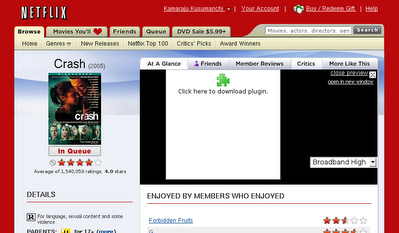
Even if you click on the green button nothing productive happens. Firefox just complains that "No suitable plugins were found". Duh!

The solution is to install the mozilla-mplayer package.
Once you do this, the videos embed nicely in firefox. The audio works fine too!

Hope that helps all you multimedia folks. Tested this on Debian Etch (testing) running firefox (1.5.dfsg+1.5.0.7-2), mozilla-mplayer (3.21-1). As usual, comments on whether the article has been helpful, errors, feedback etc., are most welcome.

Even if you click on the green button nothing productive happens. Firefox just complains that "No suitable plugins were found". Duh!
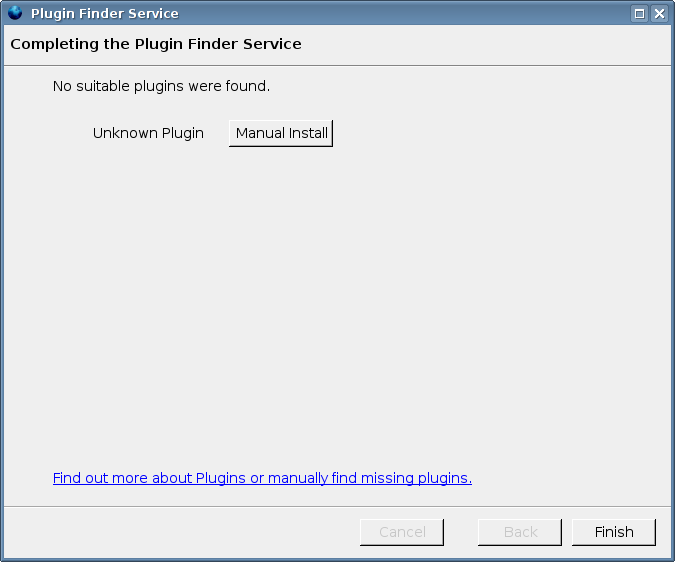
The solution is to install the mozilla-mplayer package.
rajudell:~# cat /etc/apt/sources.listAt the "Do you want to continue? [Y/n/?]" prompt, just press 'y' and then 'Enter'. Pressing 'Enter' alone will also work as 'Y' is the default here.
deb http://ftp.us.debian.org/debian/ etch main contrib non-free
deb-src http://ftp.us.debian.org/debian/ etch main contrib non-free
deb http://security.debian.org/ etch/updates main contrib non-free
deb-src http://security.debian.org/ etch/updates main contrib non-free
deb http://www.debian-multimedia.org etch main
rajudell:~# aptitude update
rajudell:~# aptitude install mozilla-mplayer
Once you do this, the videos embed nicely in firefox. The audio works fine too!
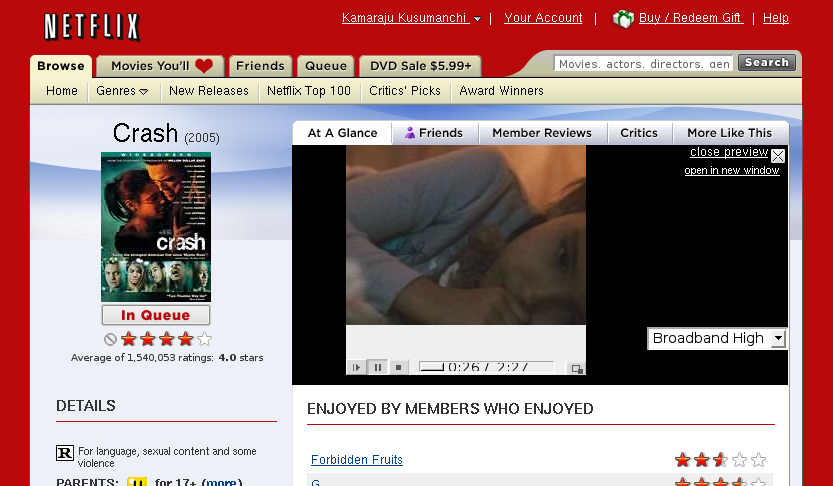
Hope that helps all you multimedia folks. Tested this on Debian Etch (testing) running firefox (1.5.dfsg+1.5.0.7-2), mozilla-mplayer (3.21-1). As usual, comments on whether the article has been helpful, errors, feedback etc., are most welcome.
Tuesday, December 26, 2006
list of all debian developers
A complete list of all Debian Developers (DDs) can be found at http://qa.debian.org/developer.php?all=1 . The entries are sorted according to email address.
Saturday, December 23, 2006
Burning ISO files in Windows XP
Imagine you are on a machine running Windows XP. Now you want to install Debian on that and make it a dual boot so that you can use both Windows and Debian as and when the need arises. There are many ways to do this. Most people start by downloading the net install image from http://www.debian.org/devel/debian-installer/ . However Windows XP, AFAIK, does not come with an iso image burning software. In order to burn the .iso file on to a CD/DVD, you can use any one of
softwares.
Both softwares are free (but not opensource). The only problem with "CDBurnerXP Pro" is that it does not work with files larger than 4.2 GB. So you cannot really burn a DVD images of say Etch distribution which are normally greater than 4.2 GB and less than 4.7 GB. However, "DeepBurner Free" has no such restriction.
According to http://www.cleansoftware.org/utility/#cddvd , "CDBurnerXP PRO" is also free from adware, spyware etc.,
PS: I was not able to find any free CD/DVD burning software for Windows XP, which has the facility to burn iso files and is released under GPL or is opensource. If you know of any, please let me know.
softwares.
Both softwares are free (but not opensource). The only problem with "CDBurnerXP Pro" is that it does not work with files larger than 4.2 GB. So you cannot really burn a DVD images of say Etch distribution which are normally greater than 4.2 GB and less than 4.7 GB. However, "DeepBurner Free" has no such restriction.
According to http://www.cleansoftware.org/utility/#cddvd , "CDBurnerXP PRO" is also free from adware, spyware etc.,
PS: I was not able to find any free CD/DVD burning software for Windows XP, which has the facility to burn iso files and is released under GPL or is opensource. If you know of any, please let me know.
Thursday, December 21, 2006
Uncle Ezra now has an RSS feed!
Sometime back I suggested to Uncle Ezra that having an RSS feed for their website would be nice. Now they have one. Cool! The feed is at http://ezra.cornell.edu/feed.php. I already added it to my RSS reader and it is working perfectly! Thank you Uncle Ezra!
Wednesday, December 20, 2006
Jack Bauer Vs Santa
For the fans of 24, here is a nice version of what happens in the world of Santa! This video is awesome. You gotta check it out!
http://www.youtube.com/watch?v=6vyw6DXkOpA
update1 : On Feb 2, 2007 I found that this video has been removed from youtube! Sorry folks!
http://www.youtube.com/watch?v=6vyw6DXkOpA
update1 : On Feb 2, 2007 I found that this video has been removed from youtube! Sorry folks!
Tuesday, November 28, 2006
atom vs rss feeds
For some reason google reader is not working correctly with the atom feed of this blog. Even when I updated some articles on the blog, the reader is not showing the new articles. So now I created a RSS feed for this blog. Both feeds are available in the Links section of the sidebar. Use the one that works for you. Please let me know if you are still having problems reading this blog ...
running ssh from web browsers
It is possible to access your Debian Linux machine from a Windows machine using just a web browser + ssh. In order to do this, start the sshd daemon on the Debian Linux machine by using either
or by doing
This will restart the ssh server if it is not running already. Next on the windows machine go to http://www.ece.osu.edu/ssh to run the ssh client. That's it!
Tested on Debian Etch (testing) running ssh 4.3p2-2, windows xp running firefox 1.5.0.8
Useful links:
$sudo /etc/init.d/ssh restart
Restarting OpenBSD Secure Shell server: sshd.
or by doing
$wajig restart ssh
Restarting OpenBSD Secure Shell server: sshd.
This will restart the ssh server if it is not running already. Next on the windows machine go to http://www.ece.osu.edu/ssh to run the ssh client. That's it!
Tested on Debian Etch (testing) running ssh 4.3p2-2, windows xp running firefox 1.5.0.8
Useful links:
Subscribe to:
Posts (Atom)